<?xml version="1.0" encoding="UTF-8" ?>
<feed xml:lang="ja" xmlns="http://www.w3.org/2005/Atom" xmlns:dc="http://purl.org/dc/elements/1.1/" xmlns:thr="http://purl.org/syndication/thread/1.0">
  <title type="text">フリーソフト・無料ソフト 強化月間</title>
  <subtitle type="html">フリーソフト体験記</subtitle>
  <link rel="self" type="application/atom+xml" href="http://freesoftware.blog.shinobi.jp/atom"/>
  <link rel="alternate" type="text/html" href="http://freesoftware.blog.shinobi.jp/"/>
  <updated>2006-10-29T00:23:56+09:00</updated>
  <author><name>No Name Ninja</name></author>
  <generator uri="//www.ninja.co.jp/blog/" version="0.9">忍者ブログ</generator>
  <atom10:link xmlns:atom10="http://www.w3.org/2005/Atom" rel="hub" href="http://pubsubhubbub.appspot.com/" />
  <entry>
    <id>freesoftware.blog.shinobi.jp://entry/69</id>
    <link rel="alternate" type="text/html" href="http://freesoftware.blog.shinobi.jp/%E3%81%AF%E3%81%98%E3%82%81%E3%81%AB/%E7%A7%BB%E8%BB%A2%E3%81%AE%E3%81%8A%E7%9F%A5%E3%82%89%E3%81%9B" />
    <published>2008-06-13T23:54:28+09:00</published> 
    <updated>2008-06-13T23:54:28+09:00</updated> 
    <category term="はじめに" label="はじめに" />
    <title>移転のお知らせ</title>
    <content mode="escaped" type="text/html" xml:lang="utf-8"> 
      <![CDATA[このたび、FC2 ブログに移転することになりました。<br />
それに伴い、ブログ名も「<a href="http://freesoftbangai.blog50.fc2.com/" target="_blank"><strong>フリーソフト・無料ソフトの番外編</strong></a>」に変わります。<br />
<br />
新しいURLは　<a href="http://freesoftbangai.blog50.fc2.com/" target="_blank">http://freesoftbangai.blog50.fc2.com/</a> で、<br />
新しいRSS は　<a href="http://freesoftbangai.blog50.fc2.com/?xml" target="_blank">http://freesoftbangai.blog50.fc2.com/?xml</a> になります。<br />
]]> 
    </content>
    <author>
            <name>No Name Ninja</name>
        </author>
  </entry>
  <entry>
    <id>freesoftware.blog.shinobi.jp://entry/68</id>
    <link rel="alternate" type="text/html" href="http://freesoftware.blog.shinobi.jp/%E3%82%AB%E3%83%A9%E3%83%BC%E3%83%94%E3%83%83%E3%82%AB%E3%83%BC/%E8%89%B2%E4%BD%BF%E3%81%84%E3%80%81%E3%81%BE%E3%81%9F%E3%81%AF%E8%89%B2%E3%81%AE%E7%B5%84%E3%81%BF%E5%90%88%E3%82%8F%E3%81%9B%20%E3%82%92%E6%A4%9C%E7%B4%A2%E3%81%99%E3%82%8B%E3%81%93%E3%81%A8%E3%81%8C%E3%81%A7%E3%81%8D%E3%82%8B%E3%82%BD%E3%83%95%E3%83%88%E3%80%8Cdesktop%20color%20finder%E3%80%8D" />
    <published>2008-06-01T13:20:01+09:00</published> 
    <updated>2008-06-01T13:20:01+09:00</updated> 
    <category term="カラーピッカー" label="カラーピッカー" />
    <title>色使い、または色の組み合わせ を検索することができるソフト「Desktop Color Finder」</title>
    <content mode="escaped" type="text/html" xml:lang="utf-8"> 
      <![CDATA[今日は、シンプルなカラーパレット検索ソフト「Desktop Color Finder」を<br />
紹介しようと思います。<br />
<ul><br />
<li><a href="http://www.adobe.com/cfusion/exchange/index.cfm?event=extensionDetail&loc=en_us&extid=1468018" target="_blank">Desktop Color Finder</a></li><br />
</ul><br />
（要「<a href="http://get.adobe.com/air/" target="_blank">Adobe AIR</a>」）<br />
<br />
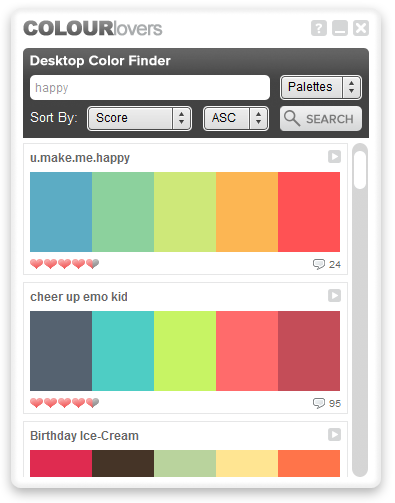
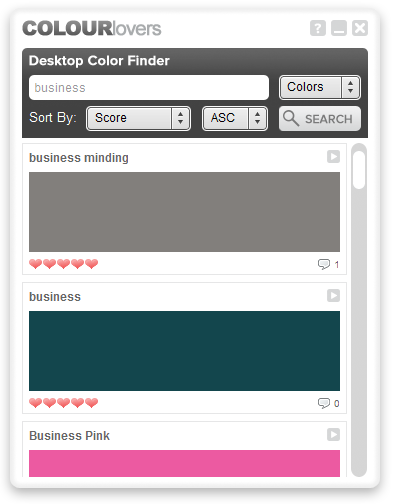
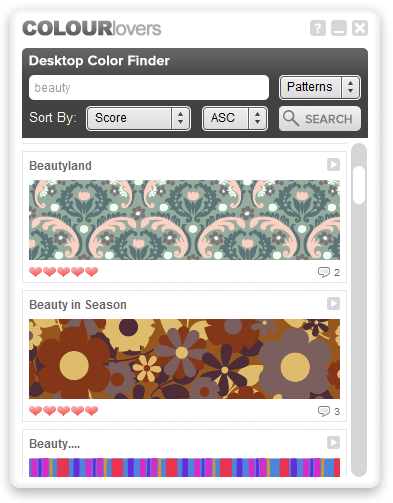
「Desktop Color Finder」は、<a href="http://www.colourlovers.com/" target="_blank">COLOURlovers</a><sup><b>※1</b></sup> 内のデータを検索することができるソフトです。<br />
<b>※1</b> <span class="gree">色、カラーパレット、パターン（テクスチャ）の投稿サイト。<br />
YouTube のカラーパレット版とでも言えば分かりやすいか...</span><br />
そのCOLOURlovers に登録されている<br />
<ul><br />
<li>色</li><br />
<li>カラーパレット（色の組み合わせ）</li><br />
<li>パターン（テクスチャ）</li><br />
</ul><br />
を、様々な条件を使って検索し、そして表示することができます。<br />
気に入ったものがあれば、そのままIE でデータの詳細ページを開くことも可能です。<br />
<span class="grey">（詳細ページでは、画像を保存したり、HEX / RGB の値を取得することができる）</span><br />
デザインのアイデアが煮詰まった時や、色使いのインスピレーションを得たい時 等に<br />
便利。<br />
<br />
<table class="default"><tr><td class="helf"><a href="//freesoftware.blog.shinobi.jp/File/desktopcolorfinder.png" target="_blank"><img src="//freesoftware.blog.shinobi.jp/Img/1212152159/" border="0" alt="Desktop Color Finder" /></a><br />
<br />
<a href="//freesoftware.blog.shinobi.jp/File/desktopcolorfinder2.png" target="_blank"><img src="//freesoftware.blog.shinobi.jp/Img/1212152171/" border="0" alt="Desktop Color Finder2" /></a></td><td class="helf"><a href="//freesoftware.blog.shinobi.jp/File/desktopcolorfinder3.png" target="_blank"><img src="//freesoftware.blog.shinobi.jp/Img/1212152192/" border="0" alt="Desktop Color Finder3" /></a></td></tr></table><br /><a href="http://freesoftware.blog.shinobi.jp/%E3%82%AB%E3%83%A9%E3%83%BC%E3%83%94%E3%83%83%E3%82%AB%E3%83%BC/%E8%89%B2%E4%BD%BF%E3%81%84%E3%80%81%E3%81%BE%E3%81%9F%E3%81%AF%E8%89%B2%E3%81%AE%E7%B5%84%E3%81%BF%E5%90%88%E3%82%8F%E3%81%9B%20%E3%82%92%E6%A4%9C%E7%B4%A2%E3%81%99%E3%82%8B%E3%81%93%E3%81%A8%E3%81%8C%E3%81%A7%E3%81%8D%E3%82%8B%E3%82%BD%E3%83%95%E3%83%88%E3%80%8Cdesktop%20color%20finder%E3%80%8D" target="_blank">続きを読む</a>]]> 
    </content>
    <author>
            <name>No Name Ninja</name>
        </author>
  </entry>
  <entry>
    <id>freesoftware.blog.shinobi.jp://entry/67</id>
    <link rel="alternate" type="text/html" href="http://freesoftware.blog.shinobi.jp/%E3%83%A9%E3%82%A4%E3%83%86%E3%82%A3%E3%83%B3%E3%82%B0%20%E3%82%BD%E3%83%95%E3%83%88/%E8%B6%85%E3%82%B7%E3%83%B3%E3%83%97%E3%83%AB%E3%81%AAiso%20%E3%82%A4%E3%83%A1%E3%83%BC%E3%82%B8%E3%83%95%E3%82%A1%E3%82%A4%E3%83%AB%E6%A7%8B%E7%AF%89%E3%82%BD%E3%83%95%E3%83%88%E3%80%8Cfolder2iso%E3%80%8D" />
    <published>2008-05-29T19:43:08+09:00</published> 
    <updated>2008-05-29T19:43:08+09:00</updated> 
    <category term="ライティング ソフト" label="ライティング ソフト" />
    <title>超シンプルなISO イメージファイル構築ソフト「Folder2Iso」</title>
    <content mode="escaped" type="text/html" xml:lang="utf-8"> 
      <![CDATA[今日は、超シンプルなISO イメージファイル構築ソフト「Folder2Iso」を<br />
紹介しようと思います。<br />
<ul><br />
<li><a href="http://www.trustfm.net/divx/SoftwareFolder2Iso.php?page=Folder2IsoDownload&b2=1" target="_blank">Folder2Iso</a></li><br />
</ul><br />
「Folder2Iso」は、任意のフォルダを、<a href="http://www.gigafree.net/faq/word/imgfile.html" target="_blank">ISO イメージファイル</a>に変換することができる<br />
ソフトです。<br />
超シンプルなインターフェースが特徴的なソフトで、基本的に “ 変換元のフォルダ ” と<br />
“ 出力先のファイル名 ” を指定するだけで操作は完了します<sup><b>※1</b></sup>。<br />
<b>※1</b> <span class="gree">作成されたイメージのファイルシステムは、「ISO9660 Joliet」になる。 </span><br />
また、非常に多くの文字セットに対応しているところも大きなポイントと言えるでしょう<sup><b>※2</b></sup>。<br />
<b>※2</b> <span class="gree">...なのだが、私の環境では、日本語対応の文字セットを選択した場合、<br />
正常にイメージ化することができなかった...（Vista / ver1.4）</span><br /><a href="http://freesoftware.blog.shinobi.jp/%E3%83%A9%E3%82%A4%E3%83%86%E3%82%A3%E3%83%B3%E3%82%B0%20%E3%82%BD%E3%83%95%E3%83%88/%E8%B6%85%E3%82%B7%E3%83%B3%E3%83%97%E3%83%AB%E3%81%AAiso%20%E3%82%A4%E3%83%A1%E3%83%BC%E3%82%B8%E3%83%95%E3%82%A1%E3%82%A4%E3%83%AB%E6%A7%8B%E7%AF%89%E3%82%BD%E3%83%95%E3%83%88%E3%80%8Cfolder2iso%E3%80%8D" target="_blank">続きを読む</a>]]> 
    </content>
    <author>
            <name>No Name Ninja</name>
        </author>
  </entry>
  <entry>
    <id>freesoftware.blog.shinobi.jp://entry/65</id>
    <link rel="alternate" type="text/html" href="http://freesoftware.blog.shinobi.jp/%E3%83%95%E3%82%A1%E3%82%A4%E3%83%AB%E5%89%8A%E9%99%A4/%E3%83%95%E3%82%A1%E3%82%A4%E3%83%AB%E3%82%84%E3%83%95%E3%82%A9%E3%83%AB%E3%83%80%E3%82%92%E3%80%81%E5%8F%B3%E3%82%AF%E3%83%AA%E3%83%83%E3%82%AF%E3%83%A1%E3%83%8B%E3%83%A5%E3%83%BC%E3%81%8B%E3%82%89%E7%9B%B4%E6%8E%A5%E5%AE%8C%E5%85%A8%E5%89%8A%E9%99%A4%E3%80%8Ceasy%20shred%E3%80%8D" />
    <published>2008-05-17T19:54:22+09:00</published> 
    <updated>2008-05-17T19:54:22+09:00</updated> 
    <category term="ファイル削除" label="ファイル削除" />
    <title>ファイルやフォルダを、右クリックメニューから直接完全削除「Easy Shred」</title>
    <content mode="escaped" type="text/html" xml:lang="utf-8"> 
      <![CDATA[今日は、右クリックメニューから直接ファイルやフォルダを<b>完全削除</b>できるようにする<br />
ソフト「Easy Shred」を紹介しようと思います。<br />
<ul><br />
<li><a href="http://www.e-eeasy.com/free-software.aspx" target="_blank">Easy Shred File Shredder</a></li><br />
</ul><br />
「Easy Shred」は、ファイルやフォルダを<span class="grey">（復元できないように）</span>完全に削除することができるソフトです。<br />
操作は、ファイルやフォルダの右クリックメニューから、または、「Easy Shred」の<br />
ショートカットアイコンへのドラッグ＆ドロップから行うことができ、直感的に使うことが<br />
できます。<br />
設定という設定も特にないので、操作は非常に簡単です。<br /><a href="http://freesoftware.blog.shinobi.jp/%E3%83%95%E3%82%A1%E3%82%A4%E3%83%AB%E5%89%8A%E9%99%A4/%E3%83%95%E3%82%A1%E3%82%A4%E3%83%AB%E3%82%84%E3%83%95%E3%82%A9%E3%83%AB%E3%83%80%E3%82%92%E3%80%81%E5%8F%B3%E3%82%AF%E3%83%AA%E3%83%83%E3%82%AF%E3%83%A1%E3%83%8B%E3%83%A5%E3%83%BC%E3%81%8B%E3%82%89%E7%9B%B4%E6%8E%A5%E5%AE%8C%E5%85%A8%E5%89%8A%E9%99%A4%E3%80%8Ceasy%20shred%E3%80%8D" target="_blank">続きを読む</a>]]> 
    </content>
    <author>
            <name>No Name Ninja</name>
        </author>
  </entry>
  <entry>
    <id>freesoftware.blog.shinobi.jp://entry/64</id>
    <link rel="alternate" type="text/html" href="http://freesoftware.blog.shinobi.jp/%E3%83%9E%E3%82%A6%E3%82%B9/%E3%83%9E%E3%82%A6%E3%82%B9%E3%82%84%E3%82%AD%E3%83%BC%E3%83%9C%E3%83%BC%E3%83%89%E3%82%92%E3%83%AD%E3%83%83%E3%82%AF%E3%81%99%E3%82%8B%E3%81%93%E3%81%A8%E3%81%8C%E3%81%A7%E3%81%8D%E3%82%8B%E3%82%BD%E3%83%95%E3%83%88%E3%80%8Ckid-key-lock%E3%80%8D" />
    <published>2008-04-25T19:34:05+09:00</published> 
    <updated>2008-04-25T19:34:05+09:00</updated> 
    <category term="マウス" label="マウス" />
    <title>マウスやキーボードをロックすることができるソフト「Kid-key-lock」</title>
    <content mode="escaped" type="text/html" xml:lang="utf-8"> 
      <![CDATA[今日は、マウスやキーボードをロックすることができるソフト「Kid-key-lock」を<br />
紹介しようと思います。<br />
<ul><br />
<li><a href="http://www.100dof.com/kidkeylock.html" target="_blank">Kid-key-lock</a></li><br />
</ul><br />
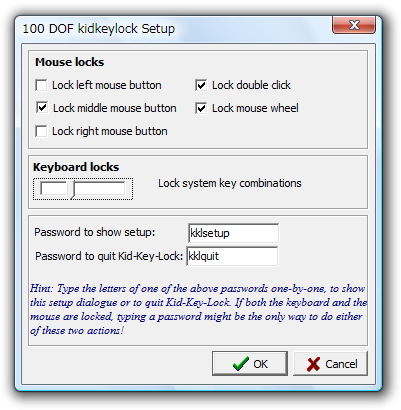
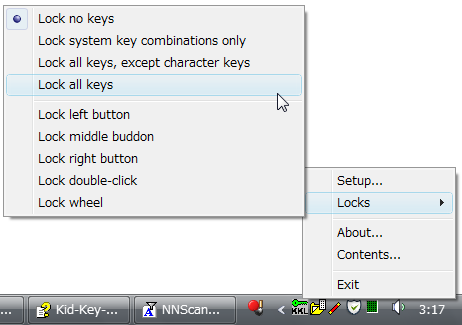
「Kid-key-lock」は、マウスやキーボードをロックすることができるソフトです。<br />
マウスやキーボードの操作を完全に無効化してしまうのではなく、たとえば<br />
<ul><br />
<li><span class="undr">マウスの右ボタン</span> と、</li><br />
<li><span class="undr">ダブルクリック</span> と、</li><br />
<li><span class="undr">文字キー以外の全てのキー</span></li><br />
</ul><br />
をロックする...<br />
といった具合に、ロックするものをある程度自由に設定できるところが大きな特徴。<br />
<br />
マウスやキーボードを掃除する時や、ちょっと席を外す時などに使えるかと思います。<br />
<br />
<table class="default"><tr><td class="helf"><a href="//freesoftware.blog.shinobi.jp/File/Kid-Key-Lock.png" target="_blank"><img src="//freesoftware.blog.shinobi.jp/Img/1209061197/" border="0" alt="Kid-Key-Lock" /></a></td><td class="helf"><a href="//freesoftware.blog.shinobi.jp/File/Kid-Key-Lock2.png" target="_blank"><img src="//freesoftware.blog.shinobi.jp/Img/1209061206/" border="0" alt="Kid-Key-Lock2" /></a></td></tr></table><br /><a href="http://freesoftware.blog.shinobi.jp/%E3%83%9E%E3%82%A6%E3%82%B9/%E3%83%9E%E3%82%A6%E3%82%B9%E3%82%84%E3%82%AD%E3%83%BC%E3%83%9C%E3%83%BC%E3%83%89%E3%82%92%E3%83%AD%E3%83%83%E3%82%AF%E3%81%99%E3%82%8B%E3%81%93%E3%81%A8%E3%81%8C%E3%81%A7%E3%81%8D%E3%82%8B%E3%82%BD%E3%83%95%E3%83%88%E3%80%8Ckid-key-lock%E3%80%8D" target="_blank">続きを読む</a>]]> 
    </content>
    <author>
            <name>No Name Ninja</name>
        </author>
  </entry>
  <entry>
    <id>freesoftware.blog.shinobi.jp://entry/63</id>
    <link rel="alternate" type="text/html" href="http://freesoftware.blog.shinobi.jp/%E7%94%BB%E5%83%8F%E7%B7%A8%E9%9B%86/%E3%83%89%E3%83%A9%E3%83%83%E3%82%B0%EF%BC%86%E3%83%89%E3%83%AD%E3%83%83%E3%83%97%E3%81%A7%E4%BD%BF%E3%81%88%E3%82%8B%E3%82%B7%E3%83%B3%E3%83%97%E3%83%AB%E3%81%AAjpeg%20%E3%83%AA%E3%82%B5%E3%82%A4%E3%82%BA%E3%83%84%E3%83%BC%E3%83%AB%E3%80%8Cpicture%20resizer%E3%80%8D" />
    <published>2008-04-17T19:25:29+09:00</published> 
    <updated>2008-04-17T19:25:29+09:00</updated> 
    <category term="画像編集" label="画像編集" />
    <title>ドラッグ＆ドロップで使えるシンプルなJPEG リサイズツール「Picture Resizer」</title>
    <content mode="escaped" type="text/html" xml:lang="utf-8"> 
      <![CDATA[今日は、ドラッグ＆ドロップで使えるシンプルなJPEG リサイズツール<br />
「Picture Resizer」を紹介しようと思います。<br />
<ul><br />
<li><a href="http://www.rw-designer.com/picture-resize" target="_blank">Picture Resizer</a><br />
</li><br />
</ul><br />
「Picture Resizer」は、シンプルなJPEG リサイズツールです。<br />
ドラッグ＆ドロップや「送る」などから送られた単一 or 複数のJPEG ファイルを、<br />
任意の縦 × 横サイズにリサイズすることができるというソフトです。<br />
操作のためのGUI（ウインドウ）は持たず、基本的にアイコンへのドラッグドロップや<br />
右クリックメニューの「送る」などを介して使います。<br />
<br />
<br />
リサイズ先の縦 × 横サイズ等を、<br />
<ul><br />
“ <span class="grey">（「Picture Resizer」本体の）</span>ファイル名を変更することにより設定する ” <br />
</ul><br />
という、ちょっと変わった特徴を持ったソフトです。<br /><a href="http://freesoftware.blog.shinobi.jp/%E7%94%BB%E5%83%8F%E7%B7%A8%E9%9B%86/%E3%83%89%E3%83%A9%E3%83%83%E3%82%B0%EF%BC%86%E3%83%89%E3%83%AD%E3%83%83%E3%83%97%E3%81%A7%E4%BD%BF%E3%81%88%E3%82%8B%E3%82%B7%E3%83%B3%E3%83%97%E3%83%AB%E3%81%AAjpeg%20%E3%83%AA%E3%82%B5%E3%82%A4%E3%82%BA%E3%83%84%E3%83%BC%E3%83%AB%E3%80%8Cpicture%20resizer%E3%80%8D" target="_blank">続きを読む</a>]]> 
    </content>
    <author>
            <name>No Name Ninja</name>
        </author>
  </entry>
  <entry>
    <id>freesoftware.blog.shinobi.jp://entry/62</id>
    <link rel="alternate" type="text/html" href="http://freesoftware.blog.shinobi.jp/%E3%82%B7%E3%82%B9%E3%83%86%E3%83%A0%E6%83%85%E5%A0%B1/%E4%BD%BF%E3%81%84%E3%82%84%E3%81%99%E3%81%84%E3%82%B7%E3%82%B9%E3%83%86%E3%83%A0%E3%82%A4%E3%83%B3%E3%83%95%E3%82%A9%E3%83%A1%E3%83%BC%E3%82%B7%E3%83%A7%E3%83%B3%E3%83%84%E3%83%BC%E3%83%AB%E3%80%8Causlogics%20system%20information%E3%80%8D" />
    <published>2008-04-11T19:45:53+09:00</published> 
    <updated>2008-04-11T19:45:53+09:00</updated> 
    <category term="システム情報" label="システム情報" />
    <title>使いやすいシステムインフォメーションツール「AusLogics System Information」</title>
    <content mode="escaped" type="text/html" xml:lang="utf-8"> 
      <![CDATA[今日は、使いやすいシステムインフォメーションツール<br />
「<strong>AusLogics System Information</strong>」を紹介しようと思います。<br />
<ul><br />
<li><a href="http://www.auslogics.com/en/software/system-information/download" target="_blank">Download Auslogics System Information</a></li><br />
</ul><br />
「AusLogics System Information」は、OS、CPU、BIOS、マザーボード、メモリ、<br />
ビデオカード、ハードディスク、I / O デバイス、インストールされているプログラム、<br />
ネットワーク構成 等々に関する情報を、分かりやすく表示してくれるソフトです。<br />
集めたシステム情報を、XML / HTML / TXT ファイルに書き出す機能も備えています。<br />
（任意の部分を選択し、クリップボードにコピーすることも可能）<br />
<br />
結構気に入っているツールではあるのですが、2 バイト文字が化けるようなので<br />
こちらのブログで紹介することにしました。<br /><a href="http://freesoftware.blog.shinobi.jp/%E3%82%B7%E3%82%B9%E3%83%86%E3%83%A0%E6%83%85%E5%A0%B1/%E4%BD%BF%E3%81%84%E3%82%84%E3%81%99%E3%81%84%E3%82%B7%E3%82%B9%E3%83%86%E3%83%A0%E3%82%A4%E3%83%B3%E3%83%95%E3%82%A9%E3%83%A1%E3%83%BC%E3%82%B7%E3%83%A7%E3%83%B3%E3%83%84%E3%83%BC%E3%83%AB%E3%80%8Causlogics%20system%20information%E3%80%8D" target="_blank">続きを読む</a>]]> 
    </content>
    <author>
            <name>No Name Ninja</name>
        </author>
  </entry>
  <entry>
    <id>freesoftware.blog.shinobi.jp://entry/61</id>
    <link rel="alternate" type="text/html" href="http://freesoftware.blog.shinobi.jp/%E3%83%97%E3%83%AD%E3%82%BB%E3%82%B9%E7%AE%A1%E7%90%86/%E6%A4%9C%E7%B4%A2%E3%83%90%E3%83%BC%E4%BB%98%E3%81%8D%E3%81%AE%E3%82%B7%E3%83%B3%E3%83%97%E3%83%AB%E3%81%AA%E3%83%97%E3%83%AD%E3%82%BB%E3%82%B9%E3%83%93%E3%83%A5%E3%83%BC%E3%82%A2%E3%80%8Csoft191%20process%20viewer%E3%80%8D" />
    <published>2008-03-29T19:32:50+09:00</published> 
    <updated>2008-03-29T19:32:50+09:00</updated> 
    <category term="プロセス管理" label="プロセス管理" />
    <title>検索バー付きのシンプルなプロセスビューア「Soft191 Process Viewer」</title>
    <content mode="escaped" type="text/html" xml:lang="utf-8"> 
      <![CDATA[今日は、検索バー付きのシンプルなプロセスビューア「Soft191 Process Viewer」を<br />
紹介しようと思います。<br />
<ul><br />
<li><a href="http://www.soft191.com/products/procview.aspx" target="_blank">Soft191 Process Viewer</a></li><br />
</ul><br />
「Soft191 Process Viewer」は、シンプルなプロセスビューアです。<br />
現在実行中のプロセスを、「名前」「パス」「プロセスID」といった情報ごとに<br />
カラム分けして一覧表示することができるソフトです。<br />
Windows 標準のタスクマネージャーを少し易しい感じにしたようなソフトで、<br />
非常にシンプルで見やすいところが大きな特徴。<br />
また、UI に検索バーを備えているので、目的のプロセスをより素早く探し出したり<br />
することができます。<br /><a href="http://freesoftware.blog.shinobi.jp/%E3%83%97%E3%83%AD%E3%82%BB%E3%82%B9%E7%AE%A1%E7%90%86/%E6%A4%9C%E7%B4%A2%E3%83%90%E3%83%BC%E4%BB%98%E3%81%8D%E3%81%AE%E3%82%B7%E3%83%B3%E3%83%97%E3%83%AB%E3%81%AA%E3%83%97%E3%83%AD%E3%82%BB%E3%82%B9%E3%83%93%E3%83%A5%E3%83%BC%E3%82%A2%E3%80%8Csoft191%20process%20viewer%E3%80%8D" target="_blank">続きを読む</a>]]> 
    </content>
    <author>
            <name>No Name Ninja</name>
        </author>
  </entry>
  <entry>
    <id>freesoftware.blog.shinobi.jp://entry/60</id>
    <link rel="alternate" type="text/html" href="http://freesoftware.blog.shinobi.jp/%E3%82%AA%E3%83%95%E3%82%A3%E3%82%B9/doc%20%E3%83%95%E3%82%A1%E3%82%A4%E3%83%AB%E3%81%AE%E5%85%A5%E5%87%BA%E5%8A%9B%E3%81%AB%E3%82%82%E5%AF%BE%E5%BF%9C%E3%81%97%E3%81%9F%E3%83%AF%E3%83%BC%E3%83%97%E3%83%AD%E3%82%BD%E3%83%95%E3%83%88%E3%80%8Cjarte%E3%80%8D" />
    <published>2008-03-12T21:26:21+09:00</published> 
    <updated>2008-03-12T21:26:21+09:00</updated> 
    <category term="オフィス" label="オフィス" />
    <title>doc ファイルの入出力にも対応したワープロソフト「Jarte」</title>
    <content mode="escaped" type="text/html" xml:lang="utf-8"> 
      <![CDATA[今日は、rtf / doc / docx / txt  / html 等のドキュメントに対応した、<br />
タブ切り替え型のワードプロセッサー「Jarte」を紹介しようと思います。<br />
<ul><br />
<li><a href="http://www.jarte.com/download.html" target="_blank">Jarte</a></li><br />
</ul><br />
「Jarte」は、タブ切り替え型のワープロソフトです。<br />
複数のWord 文書 / テキストファイルを、一つのウインドウ内にタブ形式で<br />
開いていくことができるMDI 型のソフトです。<br />
丁度「ワードパット」と「MS Word」の中間に位置するようなソフトで、そこそこ<br />
軽量にも関わらず、そこそこ高機能であるところが大きな特徴。<br />
対応している入力形式は、rtf / doc / docx 形式の文書ファイルや、txt / html / ini<br />
などのテキストファイル。<br />
作成したファイルは、rtf / doc 形式の文書ファイル、pdf 形式のファイル、または、<br />
txt / html 等のテキストファイルとして保存することができます<sup><b>※1</b></sup>。<br />
<br />
<b>※1</b> <span class="gree">非常に良いソフトですが、カギ括弧（「」）や「同」「希」など、特定の文字が<br />
含まれる行で、強制的にページブレーク（改ページ）が挿入される？ようです。</span><br /><a href="http://freesoftware.blog.shinobi.jp/%E3%82%AA%E3%83%95%E3%82%A3%E3%82%B9/doc%20%E3%83%95%E3%82%A1%E3%82%A4%E3%83%AB%E3%81%AE%E5%85%A5%E5%87%BA%E5%8A%9B%E3%81%AB%E3%82%82%E5%AF%BE%E5%BF%9C%E3%81%97%E3%81%9F%E3%83%AF%E3%83%BC%E3%83%97%E3%83%AD%E3%82%BD%E3%83%95%E3%83%88%E3%80%8Cjarte%E3%80%8D" target="_blank">続きを読む</a>]]> 
    </content>
    <author>
            <name>No Name Ninja</name>
        </author>
  </entry>
  <entry>
    <id>freesoftware.blog.shinobi.jp://entry/59</id>
    <link rel="alternate" type="text/html" href="http://freesoftware.blog.shinobi.jp/%E7%B5%82%E4%BA%86%E3%83%BB%E3%82%B7%E3%83%A3%E3%83%83%E3%83%88%E3%83%80%E3%82%A6%E3%83%B3/%E6%84%8F%E5%9B%B3%E3%81%9B%E3%81%AC%E3%82%B7%E3%83%A3%E3%83%83%E3%83%88%E3%83%80%E3%82%A6%E3%83%B3%E3%82%92%E9%98%B2%E3%81%90%EF%BC%81%E3%80%8Cxcat%20-%20anti-shutdown%E3%80%8D" />
    <published>2008-03-10T19:24:08+09:00</published> 
    <updated>2008-03-10T19:24:08+09:00</updated> 
    <category term="終了・シャットダウン" label="終了・シャットダウン" />
    <title>意図せぬシャットダウンを防ぐ！「xCAT - Anti-Shutdown」</title>
    <content mode="escaped" type="text/html" xml:lang="utf-8"> 
      <![CDATA[今日は、<br />
<ul><br />
意図せぬシャットダウンをブロックするソフト「xCAT - Anti-Shutdown」<br />
</ul><br />
を紹介しようと思います。<br />
<span class="grey">（ブルースクリーンを防止するソフトではありません）</span><br />
<ul><br />
<li><a href="http://www.xcat-industries.nl/softwareinfo.php?software=37" target="_blank">xCAT - Anti-Shutdown</a></li><br />
</ul><br />
「xCAT - Anti-Shutdown」は、OS のシャットダウンをブロックしてくれるソフトです。<br />
OS のシャットダウン / 再起動 / ログオフ を検知した際に、その処理を自動でブロックし、シャットダウンを無効化してくれます<sup><b>※1</b></sup>。<br />
<b>※1</b> <span class="gree">「xCAT - Anti-Shutdown」を実行する “ 前 ” に起動しておいたアプリケーションの終了も、一緒にブロックすることができる模様。</span><br />
誤ってパソコンをシャットダウン / 再起動させてしまうことがよくある人には、<br />
中々便利なのではないかと思います<sup><b>※2</b></sup>。<br />
<b>※2</b> <span class="gree">XP / Vista で試しましたが、XP ではかなり動作が不安定だったので、<br />
ここではVista を使っているという前提で紹介します。</span><br /><a href="http://freesoftware.blog.shinobi.jp/%E7%B5%82%E4%BA%86%E3%83%BB%E3%82%B7%E3%83%A3%E3%83%83%E3%83%88%E3%83%80%E3%82%A6%E3%83%B3/%E6%84%8F%E5%9B%B3%E3%81%9B%E3%81%AC%E3%82%B7%E3%83%A3%E3%83%83%E3%83%88%E3%83%80%E3%82%A6%E3%83%B3%E3%82%92%E9%98%B2%E3%81%90%EF%BC%81%E3%80%8Cxcat%20-%20anti-shutdown%E3%80%8D" target="_blank">続きを読む</a>]]> 
    </content>
    <author>
            <name>No Name Ninja</name>
        </author>
  </entry>
</feed>